
There’s a word game on Roblox called Last Letter. The premise is simple: a group of players sits around a table, almost like Russian roulette. The game gives you a starting letter, someone types a word, and the next player has to continue from the ending of that word.
In the first round, only the last letter matters:
- apple → e → eagle
In the second round, the overlap gets longer:
- eagle → le → levy
By the third round:
- levy → vy → vying
By the fourth round, you’re inheriting endings like ing, and the timer has shrunk from fifteen seconds to five.
It sounds manageable.
The “Dummkopf” Incident
Learning the history of linguistics in college didn’t teach me many practical skills, but it did teach me how to look for the edges of a language. The odd exceptions, the borrowed words that never quite fit, the little cracks where language behaves in unexpected ways. At some point, that instinct found its way into Last Letter.
I was playing normally when I typed dummkopf during a round-four match. It’s a German word meaning “dumb head,” the sort of thing you might hear in an old war movie and never expect to use in Roblox. I half expected the game to reject it.
Instead, it accepted the word and handed my opponent the suffix pf.
Try thinking of an English word that starts with pf. There aren’t many. The sound barely exists in English. There’s pfft, which is more of an expression than a word, and pfennig, the name of an old German coin, which the game also accepts.
That’s when I realized I had stumbled onto something. By pure accident, I had handed my opponent one of the most awkward letter combinations in the game’s dictionary. After that, I started digging through obscure words, looking for more endings that felt equally unnatural. The goal wasn’t to find long words or difficult words. It was to find suffixes that left the next player with almost nowhere to go.
Some of the best ones were surprisingly simple:
- Kuvasz, a Hungarian dog breed, leaves sz.
- Yangtze leaves tze.
- Bando leaves ndo.
- Four-letter suffixes such as chuk, euch, krit, and tral force the next player to start from an extremely specific sequence of letters, often leaving only a handful of valid answers.
At that point, the game stops being about vocabulary and becomes about setting traps. The goal shifts from finding a valid word to leaving the next player with as few options as possible. The kind of stuff that practically requires a hobbyist interest in obscure etymology.
Greek endings like odon and opod, borrowed from fossil names, can back opponents into a corner. Find a word starting with odon. Without preparation, most people can’t.
Some of these are buried in ordinary dictionaries if you’re willing to dig. What surprised me was what the game knew that wasn’t in anything I’d checked.
I’d been testing words against public sources, bouncing between Merriam-Webster, Wiktionary, and spelling bee lists in an attempt to map the edges of the game’s vocabulary. Most of the time, the pattern held. If a word appeared in enough reputable sources, the game would usually accept it.
Then I found okshoofd.
It’s an old unit of liquid measurement, traced by Wiktionary to Middle Dutch in 1475. It doesn’t appear in standard Merriam-Webster, and I’d never seen it in any spelling bee list. For all practical purposes, it’s the kind of word that survives only because somebody wrote it down centuries ago.
The game accepted it.
What caught my attention wasn’t the word itself, but how it ended: fd. That’s an unusually awkward suffix, so I started looking for other words that shared it. Eventually I found transfd, a non-standard abbreviation for transferred buried in Merriam-Webster’s abbreviations appendix.
The game accepted that too.
That was when I realized the dictionary wasn’t limited to ordinary words. It also included at least some non-standard abbreviations. Once you know that, combinations that look impossible suddenly become playable:
- bkcy → bankruptcy
- bkgd → background
That means a word like yrbk (yearbook) or nabk (a type of tree) can leave your opponent with bk, only for the correct answer to turn out to be a bankruptcy abbreviation.
The deeper I dug, the stranger the dictionary became. It felt much closer to Merriam-Webster Unabridged than the roughly 200,000-word collegiate dictionaries most people think of when they hear “the dictionary.” Obscure historical terms, abbreviations, niche technical words, and all kinds of linguistic oddities kept showing up.
This was one of the first strange things I noticed. The dictionary felt a lot like Merriam-Webster Unabridged, but it wasn’t a perfect match. Some words accepted by the game didn’t seem to appear in the Unabridged at all, while some words from the Unabridged were rejected outright. There were also accepted entries that I couldn’t find in any obvious source.
That ruled out the simplest explanation. Since Merriam-Webster Unabridged isn’t open source, it couldn’t have been copied directly anyway. Whatever dictionary the game was using, it seemed to be its own thing, borrowing from multiple sources or evolving separately over time.
The closest match I found was dwyl/english-words. A plain text file of 479,000 English words, hosted on GitHub. Jackpot.
The next part gets technical. If you’re here for the takeaway, skip ahead to What I Actually Learned.
Clever for About an Hour
The first version of what became Letter Demon was embarrassingly simple: a Python lookup tool with a bare-bones window, an input box, a button, and a list of results. Type a prefix, get every matching word.
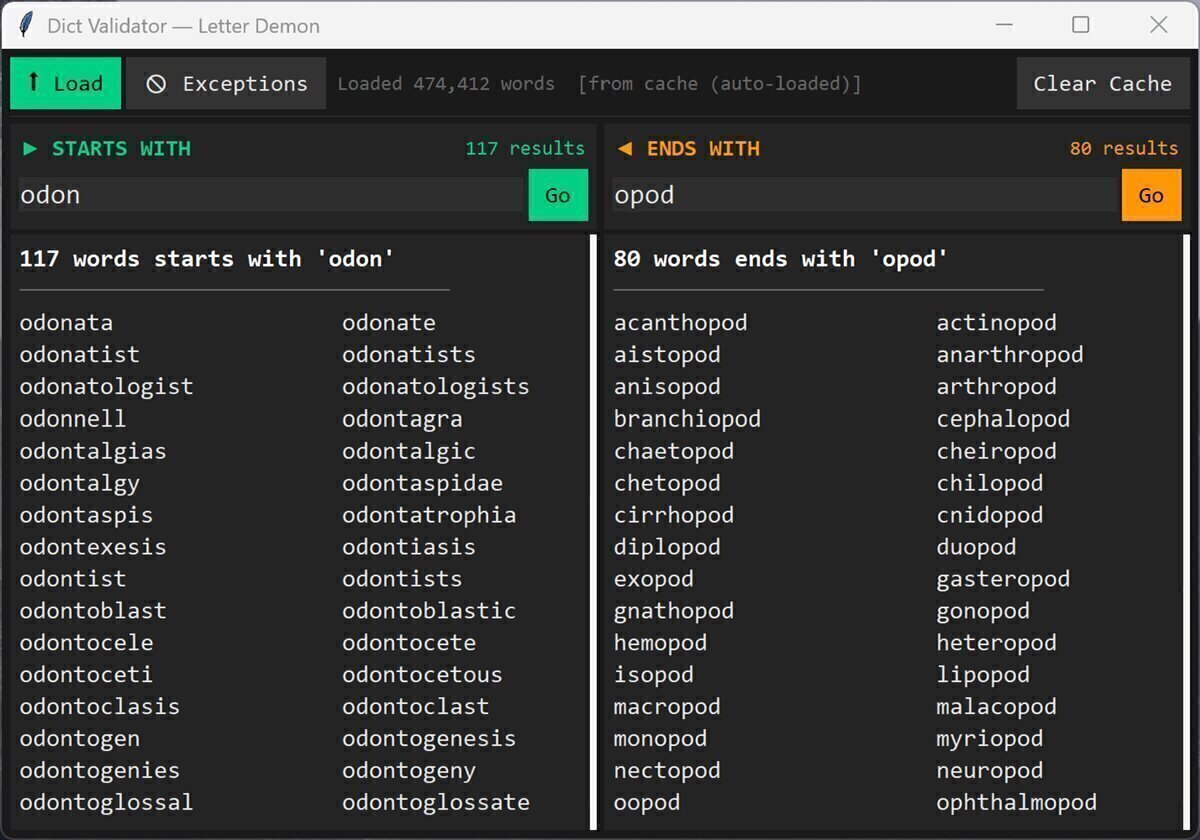
The problem was that it worked too slowly.
Scanning nearly half a million words one by one doesn’t sound expensive until you’re staring at a five-second timer. By the time the results appeared, half your thinking time was already gone.
So I rebuilt the lookup using binary search.
If you’ve ever looked up a word in a physical dictionary, you’ve probably used the same idea without realizing it. You don’t start on page one and read forward. You open somewhere near the middle, check whether you’ve gone too far, cut the remaining search space in half, and repeat until you land where you need to be.
The code ended up being surprisingly small:
1def search_starts(words, query):
2    lo = bisect.bisect_left(words, query)
3    hi = bisect.bisect_right(words, query + "~")  # "~" sorts after any letter — clean upper bound
4    return words[lo:hi]
Instead of checking all 479,000 entries, the search only needs around 38 comparisons. Instant.
Suffix matching worked differently. The engine only used binary search for prefixes. Trap scoring happened afterward by checking each candidate word’s ending against a list of known handwritten traps.
That solved the lookup problem but it didn’t solve the workflow problem. I was still alt-tabbing out of Roblox, typing prefixes by hand, picking a word, then tabbing back and typing it before the timer ran out.
At some point I realized I was spending more effort operating the tool than playing the game. So naturally, I made the next terrible decision.
I started building something that could play for me and that project eventually became Letter Demon.
Here Comes the Demon
I named it that because “Word Assistant” was too honest.
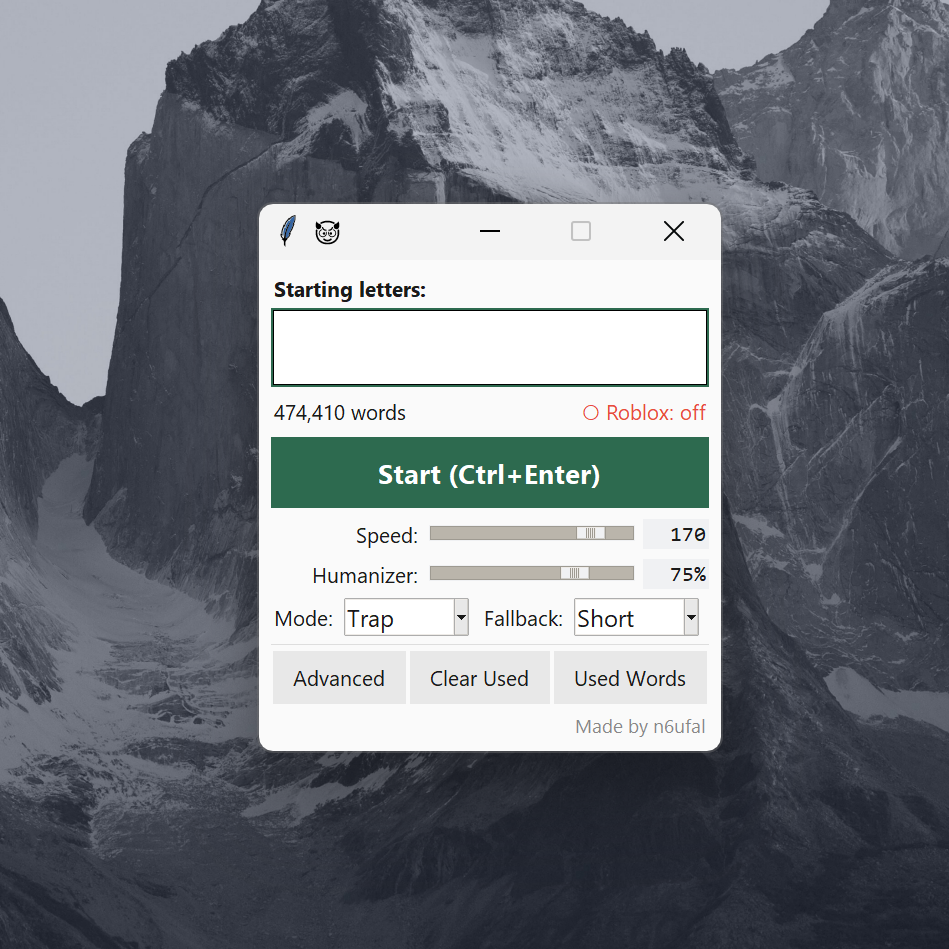
Letter Demon doesn’t just suggest words. It finds a valid word, types it out automatically, then waits for the next round. Like any good demon, it only shows up when it’s invited.
The Dictionary’s Soul
The first real problem showed up almost immediately.
Every time I launched the tool, it had to load a dictionary containing nearly 500,000 words. For a quick script, waiting a second isn’t a big deal. For something you’re actively using between rounds, it feels sluggish. I wanted the tool to feel instant.
So I added a cache:
 1def load_wordlist_from_dict(dict_path):
 2    cache_path = get_cache_path(dict_path)
 3
 4    # Is the cache file newer than the dictionary?
 5    if _cache_is_valid(cache_path, dict_path):
 6        with open(cache_path, "r", encoding="utf-8") as f:
 7            wordlist = f.read().splitlines()
 8        return wordlist, True
 9
10    # Parse from scratch and save for next time
11    words_set = _load_dict_file(dict_path)
12    wordlist = sorted(words_set)
13
14    with open(cache_path, "w", encoding="utf-8") as f:
15        f.write("\n".join(wordlist))
16
17    return wordlist, False
The cache ended up being the easy part. I didn’t bother with hashes or anything fancy, just file modification times. If the dictionary hadn’t changed, use the cached version. If it had, rebuild it.
That alone cut startup time from about a second to around 50 milliseconds, which was more than good enough. What I almost missed, though, was that the dictionary by itself wasn’t very useful.
The dictionary could tell me what words existed. The trap list told me which ones would ruin someone’s day.
The Trap List: My Secret Sauce
Letter Demon tries to find words that end in suffixes that are nightmares to continue from.
That list, trap_endings.txt, is entirely hand-curated. Every entry on it got there the same way: either I trapped someone with it, or someone trapped me.
Whenever I found a suffix that consistently made people freeze, I’d write it down. Whenever I got blindsided by one myself, I’d write that down too.
Over time, the list became less of a text file and more of a catalog of accumulated pain. Each entry is a suffix that’s unusually difficult to continue from. If a word ends with one of these letter combinations, the next player inherits it and has to find a valid word that starts with it.
Most people can find a word starting with ing. Far fewer can find one starting with ocy, loh, xo, tze, sz, or odon while a five-second timer is counting down.
That’s what makes these suffixes so effective. The solutions often exist, but they’re obscure enough that most players won’t know them, and the timer is too short to go hunting for answers.
1ocy
2loh
3xo
4sz
5tze
6odon
7opod
8trak
9...
Every time an opponent got stuck on a suffix, or every time I got stuck myself, I’d write it down.
Some traps are stronger than others. Generally, the longer the suffix, the more devastating it becomes. By round four, your opponent has to find a word starting with all four letters, which quickly turns obscure endings into dead ends.
The scoring itself is dead simple:
1def _trap_score(self, word: str) -> int:
2    lower = word.lower()
3    # Walk backward through suffix lengths, longest first — longer traps score higher
4    for length in range(min(len(lower), max_len), 1, -1):
5        if lower[-length:] in ending_scores:
6            return ending_scores[lower[-length:]]
7    return 0  # No known trap suffix — this word is polite
The scoring isn’t actually based on suffix length. It’s based on position.
The first entry in trap_endings.txt gets the highest score, the second gets the next highest, and so on. That means a suffix like odon can outrank sz if I’ve decided it’s more effective in practice.
The code still checks longer suffixes first so they take priority when multiple matches are possible, but the actual score comes from the ordering of the list itself.
When I switch to Trap mode, the engine scans every candidate word, checks whether its ending appears in the trap list, and picks the most painful option available. If several words share the highest score, it chooses one at random. That keeps the results varied, even though they’re all trying to accomplish the same thing.
If the dictionary knows Yangtze and the trap list knows tze, things get interesting. A normal word finder would see thousands of valid words starting with tze and stop there. Problem solved.
Letter Demon keeps going.
It isn’t trying to find a solution. It’s trying to find the solution most likely to leave the next player stranded again. One of those words is tzetze. And what does tzetze end with?
tze.
That’s the entire idea behind the system. The dictionary provides the vocabulary. The trap list provides the intent.
The Human Illusion
I couldn’t just rely on keyboard.write(). It types far too quickly and with perfect consistency. Roblox doesn’t seem to flag it as cheating, at least from what I can tell, but it never felt right. Real people don’t type with machine-like precision. We hesitate, slow down on awkward letter combinations, and occasionally pause to think.
To make the typing feel more human, I used a log-normal distribution for the delay between keypresses. Human reaction times aren’t evenly distributed. Most keystrokes happen around a typical speed, but every so often there’s a noticeably longer pause. A log-normal distribution captures that behavior surprisingly well, producing typing patterns that feel much closer to how people actually type:
 1def _next_delay(self) -> float:
 2    base_s = max(0.03, self.base_speed_ms / 1000.0)
 3
 4    if not self.jitter_on:
 5        return base_s
 6
 7    # scale controls the spread — higher means more variance between keypresses
 8    scale = (self.jitter_pct / 100.0) * 0.75
 9    mu = math.log(base_s)  # median delay equals base_speed_ms
10    delay = random.lognormvariate(mu, scale)
11
12    return max(0.03, delay)
The implementation itself is fairly simple. Every time a key needs to be pressed, the program generates a new delay value. It starts with a base typing speed, then uses a log-normal distribution to introduce variation around that speed.
Most generated delays stay close to the target typing speed, but occasionally the distribution produces longer pauses. This mirrors how people actually type. We spend most of our time at a steady pace, yet we sometimes slow down on difficult letter combinations, hesitate briefly, or lose our rhythm for a moment.
The amount of variation is controlled by a jitter/humanizer setting. Higher values create a wider spread of delays, making the typing appear less consistent and more human. To avoid unrealistic results, the code also enforces a minimum delay of 30 milliseconds.
Threading Nightmares
All of this runs in the background while a small Tkinter window stays on top of the game. The challenge is that Tkinter doesn’t handle long-running or blocking operations very well. If the typing logic runs on the main thread, the entire interface becomes unresponsive until the task finishes. On the other hand, letting multiple parts of the program access shared data at the same time can create its own problems. For example, a dictionary reload could happen in the middle of a round and leave the application in an inconsistent state.
To keep everything responsive and stable, the work is split across background threads, while shared resources are protected with reentrant locks. The threads handle the typing and game logic without blocking the interface, and the locks ensure that critical data can be accessed safely even when multiple parts of the program need it at the same time.
 1def on_play_round(self):
 2    with self._playing_lock:
 3        if self._is_playing:
 4            return  # Already typing — bail before we fire two words at once
 5        self._is_playing = True
 6
 7    self.root.withdraw()  # Hide, focus Roblox
 8
 9    # Kick off typing in a background thread so the UI stays alive
10    threading.Thread(
11        target=self._type_and_return,
12        args=(completion,),
13        daemon=True
14    ).start()
15
16def _type_and_return(self, completion):
17    try:
18        self.typer.type_text(completion)
19    finally:
20        with self._playing_lock:
21            self._is_playing = False
22        self.root.after(0, self.root.deiconify)  # Hand the UI restore back to the main thread
There are two locks in the project, each with a different purpose. Inside WordEngine, I use a reentrant lock (RLock). This lets one method safely call another method that also needs the same lock without getting stuck waiting for itself. The app’s _playing_lock is much simpler. It’s just a regular lock that makes sure only one typing thread can run at a time.
Another important piece is the after(0) call. Tkinter is very particular about threading and expects anything that changes the UI to happen on the main thread. Even if the actual work is running in a background thread, UI updates have to be handed back to Tkinter. That’s exactly what after(0) does. It schedules the update to run on the main thread as soon as possible.
It sounds like a small detail, but it’s one of those things that either works perfectly or causes mysterious crashes. Before I figured that out, I spent far longer than I’d like to admit trying to understand why the program would randomly break.
What I Actually Learned
I never really noticed the moment I went from “huh, that’s interesting” to staying up way too late fixing bugs, arguing with myself over whether “good enough” was actually good enough, and somehow overengineering a stupid macro.
Most people never suspected a thing. A few good players had theories — a word list, a dictionary, maybe AI. But in the later rounds, when the timer drops below five seconds, none of that helps. You either know the word or you don’t. Most scripts out there get caught because they’re obvious: too fast, too perfect, or faking typos that fool nobody. Letter Demon was built to blend in.
Along the way, I kept running into ideas I’d never heard of before. Binary search was one of them. When I finally understood how it worked, my reaction was basically “Wait, that’s it? That’s brilliant.” That became a recurring theme: discovering some concept I’d never seen, then immediately wanting to learn more about it. If you’re not a programmer and you’re thinking about building something, start anyway. You don’t need to know everything up front.
Ironically, the game itself eventually stopped mattering. The challenge shifted from playing to building, then testing it against real players and watching it work. Figuring out what to build, why one approach worked better than another, and how to make everything reliable ended up being more interesting than winning.
None of that changes what it was. I’ve watched opponents freeze on a suffix, run out of time, lose a heart, and leave the table. They were probably just people trying to enjoy a few rounds after school, after work, or before bed. At its core, it was a tool that gave me an advantage other players didn’t have. That’s the simplest and most honest way to describe it.
The full source code is available on GitHub: n6ufal/Letter-Demon.